
Generate an API Key
The Public API allows you to virtually read all of the data stored in your Passportal Company, and also provides basic write operations for Clients, Documents, Assets, Credentials, and more.
Now, you can generate, view, revoke and manage API keys directly from your Passportal account to help improve and streamline the API integration process.
Generating API keys as an Account Owner
- From the left navigation menu, select Settings > API Keys.
- Click API Keys tab.
- Click Create API Key button.
- Enter your inputs (Permission Level and Security Groups are required fields. Expiration (days) is optional. Click Create.
- API key pair will be provided.
Managing API Keys as an Account Owner
Passportal Account Owners can edit, rotate, view logs, or revoke API keys as needed.
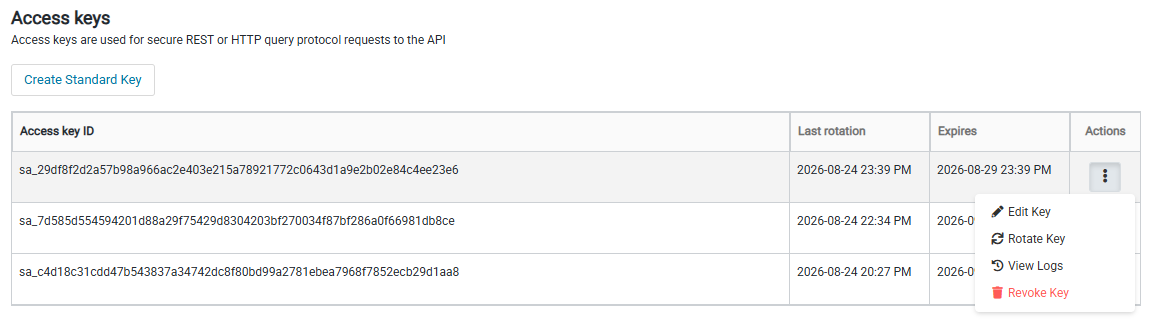
- From the left navigation menu, select Settings > API Keys.
- Use the three-dots button in Actions column to manage existing API keys as needed.
Proper permission level is required to both read and manage data in Passportal's API, and additional permissions may be required to use an API key to interact with certain endpoints. For instance, attempting to access Credential information from the API requires "Password: View/Password: Edit" permissions. Without these permissions, users will see an error in the API.
Managing Legacy Docs API Keys as an Account Owner
Passportal Account Owners can create and delete legacy API keys as needed.
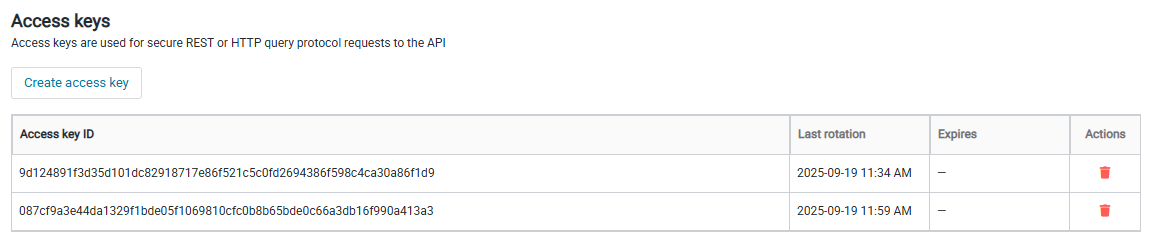
- From the left navigation menu, select Settings > API Keys.
- Click Legacy Docs API Keys tab.
- Use the 'bin' button in Actions column to delete existing API keys as needed.
Updated 15 days ago