
Troubleshooting
Solutions for common issues when using Apollo Explorer
No data
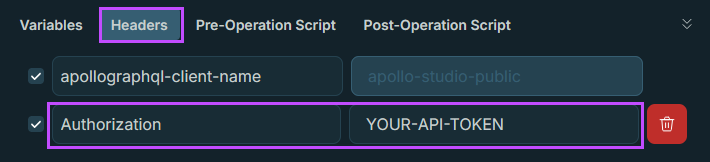
If you are seeing empty results or errors, the most common issue is missing or incorrect authorization.
Go to Headers and confirm your token is present in the correct format.
Visit Add your API token for more information.
Error Messages
GraphQL provides predictable and consistent error handling. If part of a query fails, GraphQL still returns any valid data. Errors appear in the response body instead of relying on HTTP status codes, which helps provide clearer responses. GraphQL also returns errors only for the fields the client requests, which supports consistent and easy‑to‑understand results
For details on including error messages in GraphQL, see the Error Handling section.
Common problems and fixes
401 (Unauthorised)
Meaning: Apollo did not accept your token.
Fix:
- Re-paste the token
- Check the header name and format ( make sure the
Beareris included) - Generate a fresh token if needed
403 (Forbidden)
Meaning: Your token is valid, but you do not have permission for that data.
Fix:
- Try a query for a product area you do have access to
- If you believe you should have access, contact your admin/support team
400 (Bad Request)
Meaning: The query or variables are not in the right shape.
Fix:
- Undo your last change
- Check the Variables panel for missing required values
- Start again from the saved query
data is null or you get an empty list
null or you get an empty listMeaning: Usually access, no matching records, or the wrong ID/value.
Fix:
- Try a simpler query from the collection
- Double check the ID or date range you entered
- Confirm the product is enabled and has data
MAX_HEIGHT_LIMIT, MAX_DEPTH_LIMIT, and MAX_ALIASES_LIMIT errors
Meaning: These errors indicate that your GraphQL operation exceeds system limits for height, depth, or alias count.
Fix: Contained in the Why do I see MAX_HEIGHT_LIMIT, MAX_DEPTH_LIMIT, and MAX_ALIASES_LIMIT errors? section.
Checklist
Mark this step complete
Mark as completeTick to save your progress for this tutorial.
Updated 4 months ago